


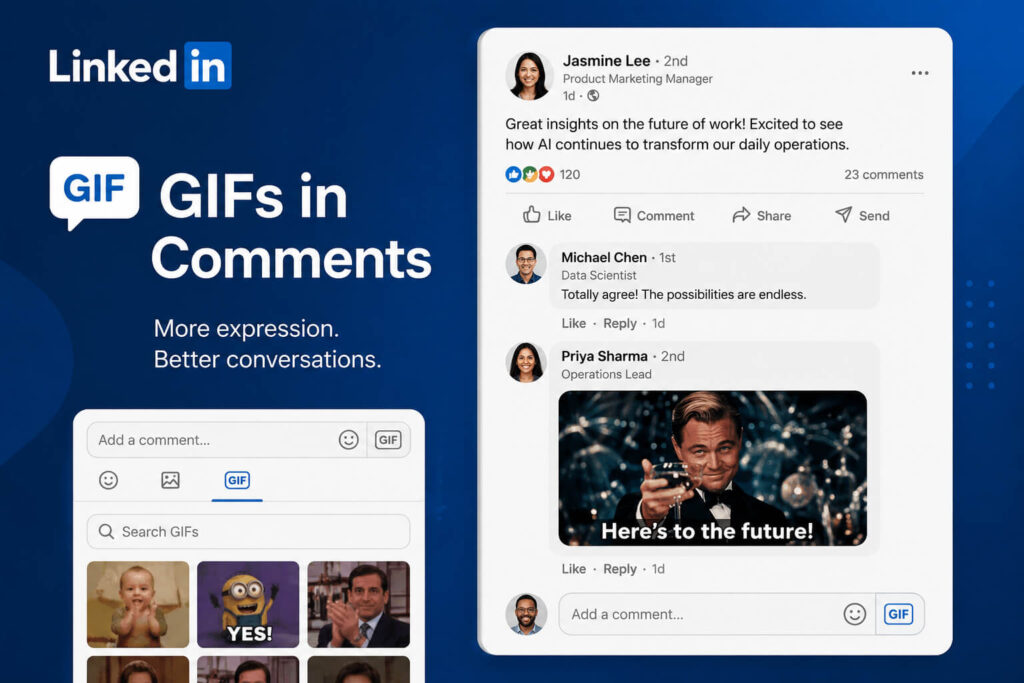
LinkedIn is adding a more expressive way for users to engage with posts, as the platform now supports GIFs directly in comments.
The update gives LinkedIn users the ability to add animated GIFs when replying to posts, making conversations on the professional networking platform a little more visual and interactive. Instead of relying only on text, emojis, or static reactions, users can now include moving animations to respond to updates, announcements, and discussions.
What’s New With LinkedIn GIF Support?
The new LinkedIn GIF support appears inside the comment reply box, where users can now find a GIF option alongside other reply tools. This makes it easier to search for and add animated responses without using a separate workaround.
Previously, users who wanted to include GIF-style animation in the LinkedIn feed often had to convert GIFs into video files, such as MP4s, before posting. With this update, LinkedIn is making GIF replies more direct and accessible.
For everyday users, this means comments can become more expressive. For creators, brands, and marketers, it adds another engagement tool that may help posts feel more conversational.
Why GIFs Matter on LinkedIn
GIFs have long been popular across social media platforms because they allow users to quickly communicate reactions, emotions, and humor. While LinkedIn is traditionally known for professional networking, the platform has gradually become more content-driven, with users sharing career updates, business insights, company news, and personal milestones.
Adding GIF support could help make comment sections more dynamic. A well-chosen GIF can make a reply stand out, encourage interaction, or add personality to a professional conversation.
However, LinkedIn users may need to be careful with how they use the feature. Because LinkedIn remains a business-focused platform, overly casual or off-brand GIFs may not always fit the tone of a professional discussion.
What This Means for Marketers and Brands
For social media managers and brand marketers, LinkedIn GIF support creates a new opportunity to engage audiences in a more human way.
Brands can use GIFs to respond to community comments, celebrate customer wins, or add a light touch to announcements. Creators may also use GIFs to increase visibility in busy comment threads.
Still, the best approach is to use GIFs strategically. A reaction GIF may work well for celebratory posts, event recaps, product launches, or team milestones. But for serious industry news, crisis communications, or formal updates, text-based responses may remain the better choice.
LinkedIn Also Updates Post Actions
Alongside GIF support, LinkedIn has also made a small change to how post actions and engagement counts are displayed. The platform is streamlining the way users see and interact with buttons such as reactions, comments, and other post actions.
While this is a smaller visual update, it could make posts look cleaner in the feed and may help users interact with content more easily.
A Small Update That Could Affect Engagement
LinkedIn’s GIF support may not be a major platform overhaul, but it is another sign that the app is making its content experience more flexible and interactive.
As LinkedIn continues to compete for user attention, small engagement features like GIF replies can help make conversations feel more active. For professionals, creators, and brands, the key will be using GIFs in a way that matches the platform’s tone while still adding personality.
Final Thoughts
LinkedIn GIF support gives users a simple new way to react to posts and participate in conversations. While the feature may seem small, it could make comments more engaging and give brands another tool for community interaction.
For users who want to stand out in LinkedIn conversations, GIFs may now become part of the platform’s evolving communication style.